A self-hosted AI API that runs models on the phones, TVs and computers you already own
You run one small hub. Your devices connect to it as nodes and do the inference; your apps call the hub with an OpenAI-compatible API and their own key. Requests go from your app to the hub to a device in your home, and no further.
It is a private beta, run by one person on a home server. It is free and there is no paid tier.
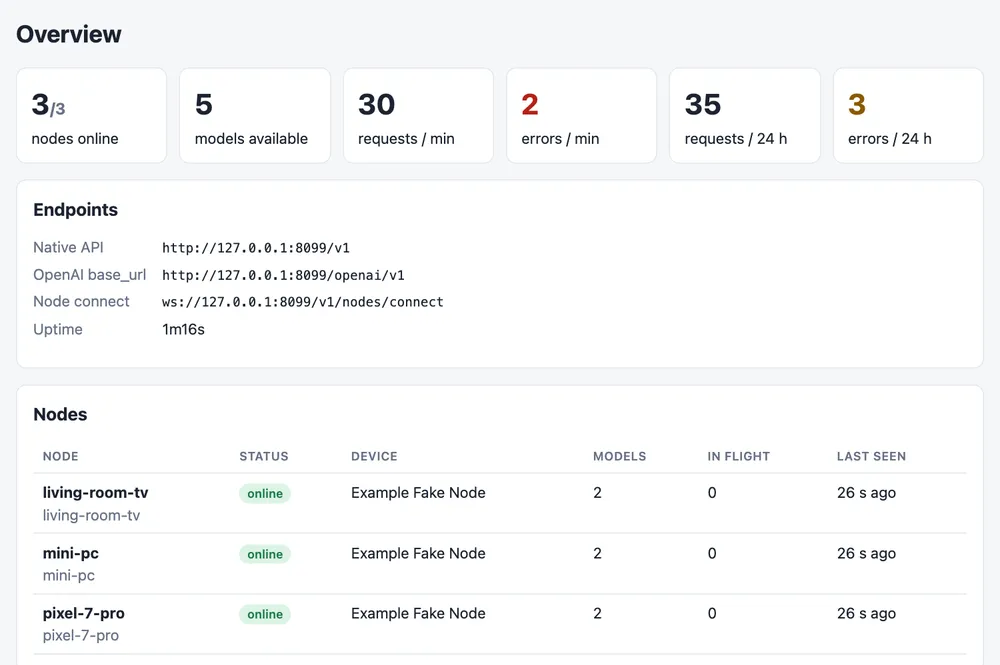
What works today
Everything below is released and in use on our own devices. The Limits column is what it does not do yet, so you know before you install it.
| Part | What it does | Limits |
|---|---|---|
| Hub | One Go binary in Docker. It holds the keys (with model scopes, rate limits and daily quotas), the audit log, Prometheus metrics, the dashboard and the router. It runs no models itself. | You host it. One hub per household or office; there is no hosted version. |
| Android app | Turns a phone or TV into a node. LiteRT on the GPU or NPU for phones, an NNAPI build for TVs and 32-bit devices. | Android 11 or newer, installed from this site (not the Play Store). No iOS. Image models only: no chat models on phones yet. |
| Linux and Mac node | kinherd-node, for amd64 and arm64. Runs image models, and chat models through llama.cpp’s llama-server with a GGUF file. | The Linux installer needs glibc 2.35+ and sets up a systemd user service. On a Mac you build kinherd-node from source for now. |
| APIs | OpenAI-compatible (/openai/v1: models, embeddings, chat completions, Responses), Anthropic Messages (/anthropic/v1/messages) and a native API for raw image bytes. | Chat needs a Linux or Mac node. A cloud provider fallback exists but is off unless the operator configures one. |
| Sealing | A client can encrypt a request for the node that runs it. The hub routes and audits the job but relays only ciphertext. | The hub still sees who called, when, which model and the sizes. |
More detail on the product page, examples on use cases, and what shipped when in the changelog.
Measured on our own devices
These come from the compatibility registry: p50 runner time on the accelerator, without queueing or model load, measured on a Pixel 7 Pro and a TCL Google TV (MediaTek MT9689) in November 2026. Some things do not run, and the registry says so.
| Model | Device | Backend | p50 | Result |
|---|---|---|---|---|
| mobilenet-v2-int8 | TCL Smart TV Pro | nnapi:mtk-mdla_shim | 4.4 ms | Works |
| mobilenet-v2-int8 | Google Pixel 7 Pro | nnapi | 0.78 ms | Works |
| efficientnet-lite4-int8 | TCL Smart TV Pro | nnapi:mtk-mdla_shim | 22 ms | Works with tweaks |
| clip-l14-336 | Google Pixel 7 Pro | litert-gpu | 1.45 s | Works |
| clip-vit-b16 | TCL Smart TV Pro | n/a | – | Failsfp32, 330 MB: out of memory while loading; the TV rebooted. |
EfficientNet-Lite4 on the TV only reaches 22 ms when the model is loaded from a memory-mapped buffer. Loaded from shared storage, SELinux keeps the NPU driver from reading the file and NNAPI quietly falls back to the CPU: about 9 s per image. Snapshot of 2026-11-18; see the registry for all results.
Add a device
On Linux, curl -fsSL https://ai.baseira.casa/install.sh | sh downloads the node, checks it against the release’s signed checksums and pairs it. With a binary you built yourself, or on a Mac, it is three commands. Each one is safe to run again.
$ kinherd-node pair ai.baseira.casa

  Approve this device on the hub:

      code  K7TQ-3MZA
      at    https://ai.baseira.casa/admin/pair

  The hub will show: Intel NUC11, x86_64, Ubuntu 24.04, 15872 MB RAM

  Waiting (expires in 15 min; Ctrl-C to stop)…
Paired with home-hub as "nuc" (wss://ai.baseira.casa/v1/nodes/connect). Token saved to /home/me/.config/aigw-node/credentials.json (mode 600).
Trusting publisher key(s) 9f5f41fe560113f7; recipes are applied automatically.
Next: kinherd-node install   (the service; or: kinherd-node run)   then   kinherd-node up   (chat models, wait until online)
$ kinherd-node install
wrote /home/me/.config/systemd/user/kinherd-node.service
started; `kinherd-node status` shows what it does, `journalctl --user -u kinherd-node -f` its log.
To keep it running while you are logged out (headless boxes): loginctl enable-linger $USER
$ kinherd-node up --yes
backed up config.json to /home/me/.config/aigw-node/config.json.bak-20261120T101502Z
added chat model "qwen2.5-1.5b-instruct-q4_k_m": /home/me/models/qwen2.5-1.5b-instruct-q4_k_m.gguf (llama-server /usr/local/bin/llama-server, context 8192, 1 slot(s), ~2986 MB)
edit ~/.config/aigw-node/config.json "llm" to change them (docs/LLM.md)
waiting for home-hub to report the node online (up to 5m0s; Ctrl-C stops waiting, the node keeps running)…
  connecting to the hub…
  online; loading [qwen2.5-1.5b-instruct-q4_k_m]…
Online: home-hub has node "nuc".
Serving: efficientnet-lite4-int8, qwen2.5-1.5b-instruct-q4_k_m
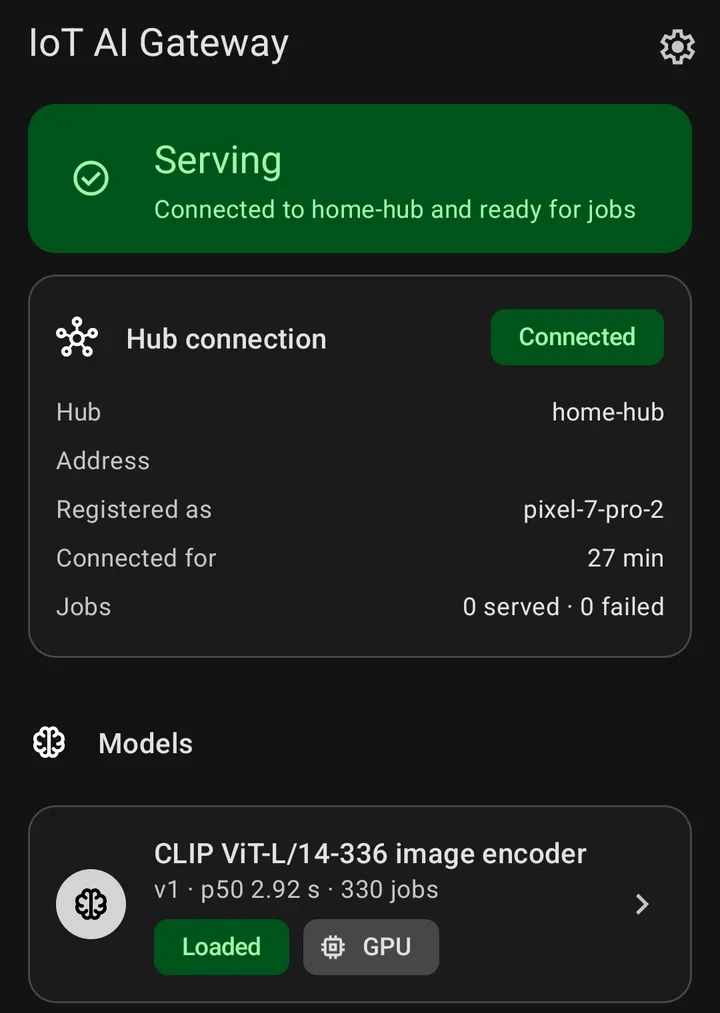
APKs and the installer are on the download page. There is no TV screenshot here yet; the TV runs the same app.
Call it from code
from openai import OpenAI
import base64

hub = OpenAI(base_url="https://<your-hub>/openai/v1", api_key="sk-aigw-…")
img = "data:image/jpeg;base64," + base64.b64encode(open("photo.jpg", "rb").read()).decode()

vec = hub.embeddings.create(model="clip-l14-336", input=[img]).data[0].embedding
# the answer's servedBy says which node ran it
Point an OpenAI client at the hub and use a key from the dashboard. The hub picks the node that has the model loaded and the lowest measured latency, and retries once on another node if the first one drops.
- OpenAI-compatible API
- Anthropic-compatible API
- Native API (raw image bytes in, labels or a vector out)
- Node protocol (JSON over one WebSocket)
Where your data goes
Inference runs on your devices. The hub does not keep request bodies, and in the self-hosted setup nothing about your requests reaches us. Nodes connect out to the hub over TLS and open no port at home, so they also work behind NAT or on mobile data.
Every request gets one audit entry: time, key, model, node, status, latency and bytes. Keys and image data are never logged. This website has no analytics and sets no cookies, and the live demo runs its model in your browser.
Private beta
Invitations go out from the waitlist in small groups. Tell us which devices you have and what you would run on them.